
Connect people and the right group
Each person connects their own AA split account privately. One Telegram chat maps to one AA group.
- Connect your account through the app’s Telegram setup.
- Link the intended group and check the members before entering expenses.
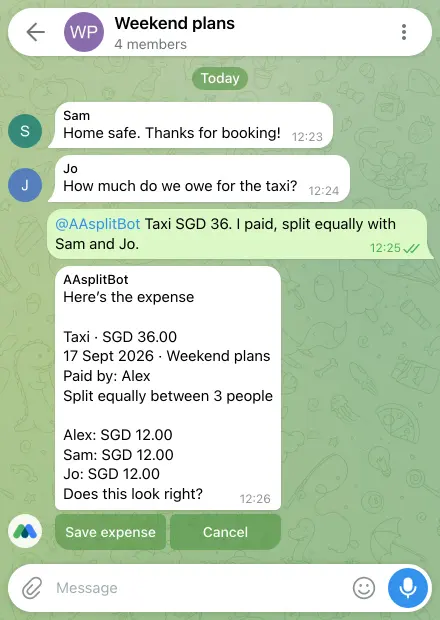
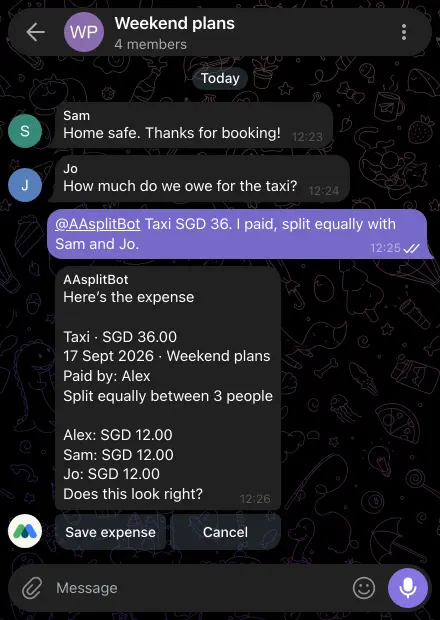
- Send a message or receipt, inspect the proposed change, and confirm or correct it.
Keep private questions private
Replies in a linked Telegram group are visible to that chat. Ask about your Personal expenses, other groups and AI allowance in your DM or the app. A seven-day meal viewer does not gain account or bot access.
Understand the boundaries
The bot handles linked groups up to 20 members and lists of up to eight expenses. Every account gets free AI receipt scans each day, and a monthly AI allowance for AA assistant and category help, shared between the app and Telegram. Beyond those, optional AA credits pay for more, or you can wait for them to come back. Manual entry and device OCR stay unlimited. Straightforward messages can run without using the allowance. Read-only and paused modes are available. You need connectivity, and writes still need your confirmation.
See Get the app for mobile availability. See what’s free · Privacy notice